Plotting Crosslink Type Distribution
from pyXLMS import __version__

print(f"Installed pyXLMS version: {__version__}") Installed pyXLMS version: 1.3.0from pyXLMS import parser
from pyXLMS import plottingAll plotting functionality is available via the plotting submodule. We also import the parser submodule here for reading result files.
parser_result = parser.read(
    "../../data/ms_annika/XLpeplib_Beveridge_QEx-HFX_DSS_R1.pdResult",
    engine="MS Annika",
    crosslinker="DSS",
) Reading MS Annika CSMs...: 100%|████████████████████████████████████████████████████████████████████████████████████████████████████| 826/826 [00:00<00:00, 12047.07it/s]
Reading MS Annika crosslinks...: 100%|██████████████████████████████████████████████████████████████████████████████████████████████| 300/300 [00:00<00:00, 21431.22it/s]We read crosslink-spectrum-matches and crosslinks using the generic parser from a single .pdResult file.
fig, ax = plotting.plot_crosslink_type_distribution(
    parser_result["crosslink-spectrum-matches"],
    figsize=(7.0, 4.0),
    filename_prefix="crosslink_type_dist_csms",
)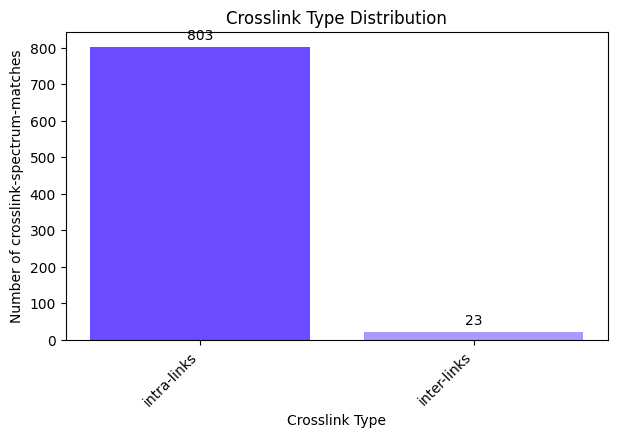
We can plot the crosslink type distribution (intra- and inter-links) for our crosslink-spectrum-matches by passing them as the first argument. The default figure size is 16 by 9 inches and does not need to be set explicitly, we just used a smaller one here for demonstration purposes. The filename_prefix parameter is also optional, if it is given the plot is saved four times: once without the title in .png and .svg format, and once with the title in .png and .svg format.
fig, ax = plotting.plot_crosslink_type_distribution(
    parser_result["crosslinks"],
    plot_type="pie",
    title="Crosslink Type Distribution as Pie Chart",
    figsize=(7.0, 4.0),
)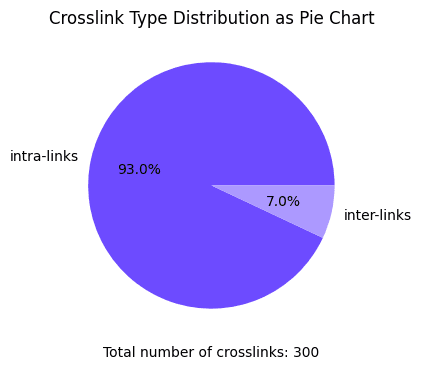
We can do the same plot for our crosslinks by passing them as the first argument instead. This time we also specify plot_type="pie" to draw a pie chart instead and additionally specify a title for our plot via the title parameter. Since we did not specify a filename_prefix the plot is not saved to disk. There are also other parameters that can be set to tune your plot like colors, you can read more about all the possible parameters here: docs.